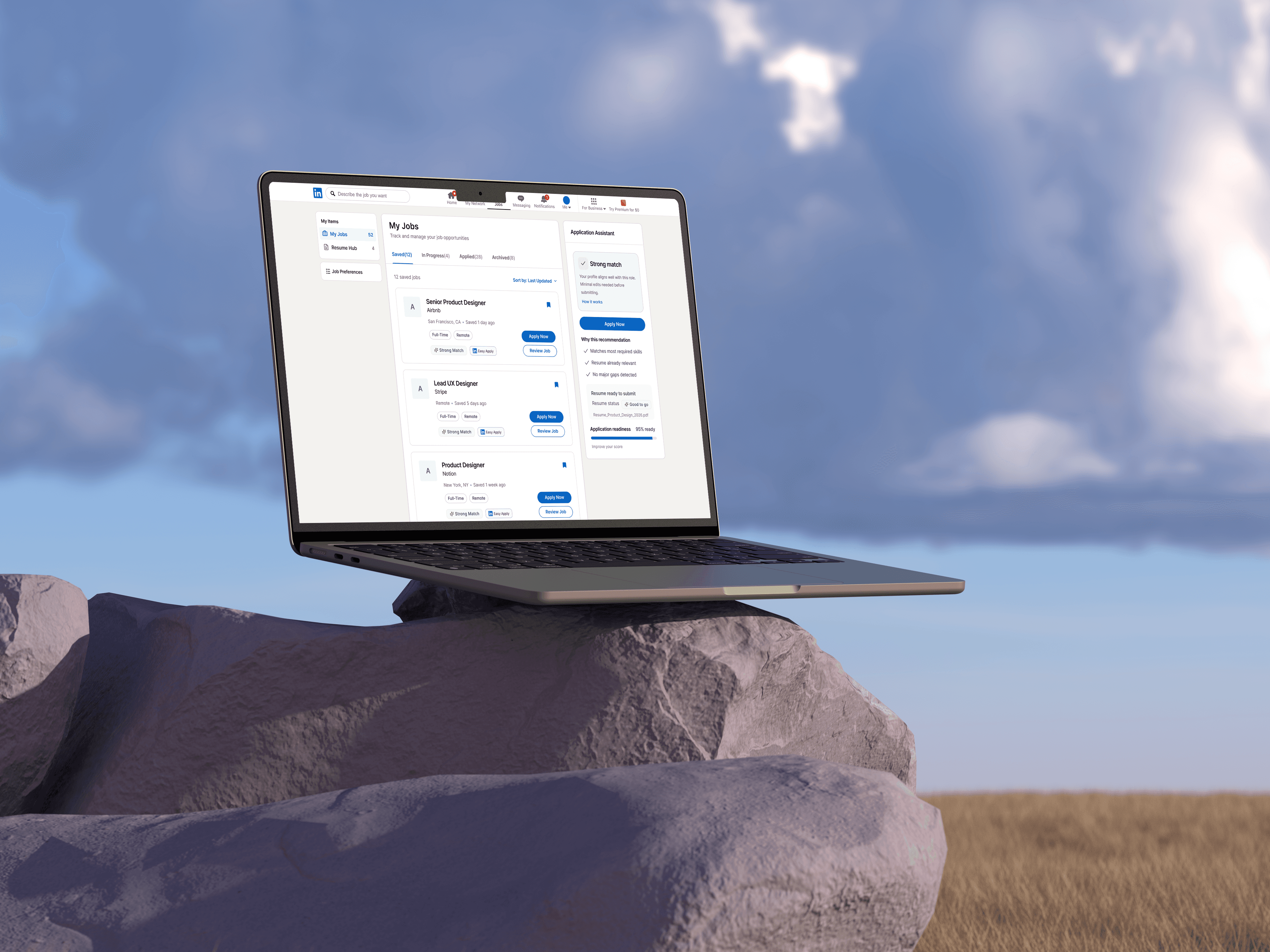
Helping candidates apply faster, smarter, and with
confidence by bridging the gap between talent and global opportunities.
Year
2026
Role
Product designer
Scope
UX / AI / AR
Award
Spring Show 2026
01
Overview

Problem
Job seekers save and apply to many roles, but LinkedIn gives limited support for tracking external applications, comparing job fit, and managing resume versions.

Solution
I redesigned the job-seeking flow with an External Apply Assistant, smarter saved-job organization, application progress tracking, and a Resume Hub.

Impact
The redesign reduces uncertainty, improves application clarity, and helps users move from browsing jobs to taking confident action.
01
Pain Points
Job seekers don’t just need more job listings, they need a system that helps them decide, prepare, apply, and follow up.
01/ Low confidence before applying
Job descriptions are long, inconsistent, and hard to compare with the user’s resume.

02/ Resume and version chaos
Users need different resumes for different roles, but LinkedIn does not help them manage tailored versions clearly.

03/ Fragmented application journey
Users often leave LinkedIn to apply externally, but lose track of where they applied and what happened next.

01
Research Goal
Understand where job seekers lose confidence, time, or clarity during the LinkedIn application process.
Insight 03
Tracking applications across
LinkedIn is hard.
65%
of users lose track of
applications or status.
“
I forget where I applied and what the status is.
I need one place to see everything.
- Larissa, 23
Early-Career
01
Key Insight
Users don’t experience job seeking as a single application. They experience it as a messy pipeline of saved jobs, external links, resume versions, and uncertain follow-ups.





01
Primary User


Maya Umarova
Marketing Coordinator · 24
Early-career job seeker applying to multiple UX/Product Design roles while balancing school, work, and visa-related timing.
Mobile-first
Multi-device
Early-career
Resume juggler
I find great jobs on my commute but by the time I'm at my laptop, I've lost the thread or worse, applied to the wrong version.
Behaviors
Saves many roles for later
Applies across LinkedIn and external company sites
Tailors resume manually
Tracks progress across notes, email, and spreadsheets
Pain Points
A clearer way to know which jobs are worth applying to, what materials to use, and what stage each application is in.
Core Need
A clearer way to know which jobs are worth applying to, what materials to use, and what stage each application is in.
01
Design Strategy
01
Clear Status Visibility
Every application in one place: saved, in-progress, submitted, or rejected without switching contexts.
02
Lower Application Friction
Fewer steps between discovering a role and completing the apply, with smart defaults that carry over.
03
Cross-Device Continuity
Browse on mobile, refine on desktop. Progress, saves, and drafts follow the user across every session.
04
Clear Status Visibility
Surface the right signals fit, deadline, history, so users act from clarity rather than anxiety.
Sketches

Major Solutions
Feature 1
Save Job Page
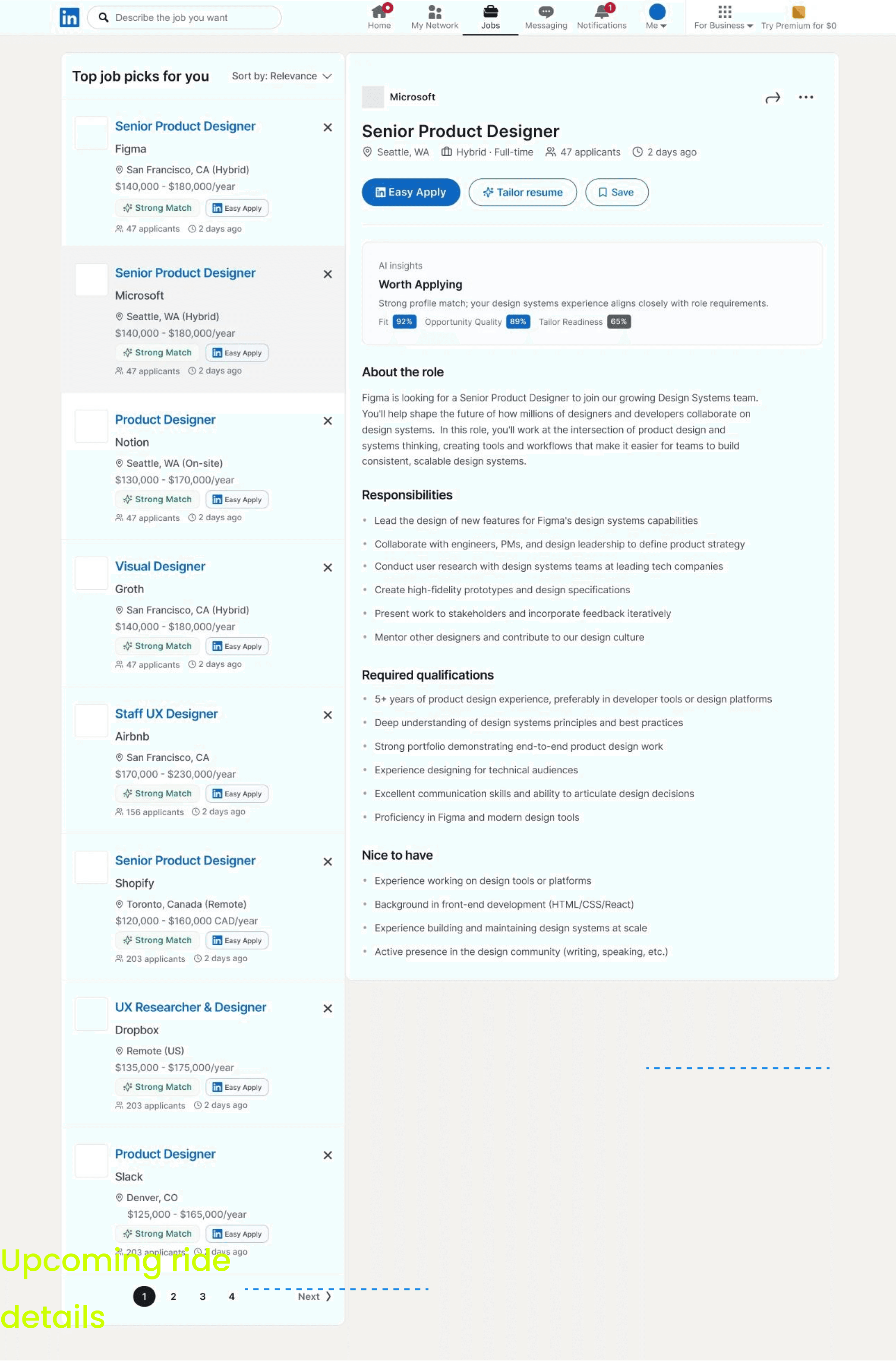
A more actionable saved-jobs experience that improves status visibility and helps users understand what to do next.

USER PAIN POINTS
Users struggled to understand what to do after saving a job.
Saved jobs lacked clear status visibility
There was little guidance on what action to take next
The page felt more like a passive list than a management tool
Before

After

DESIGN DECISION
• Clearer status visibility
Made saved, in-progress, applied, and archived states easier to distinguish at a glance.
• Better next-step guidance
Helped users understand what action to take after saving a role, rather than leaving jobs in a passive list.
• More actionable organization
Reframed the page as a management space for tracking opportunities, not just storing them.
Why it matters
This turns saved jobs from a passive list into an active decision-making space.
Feature 2
Job Detail
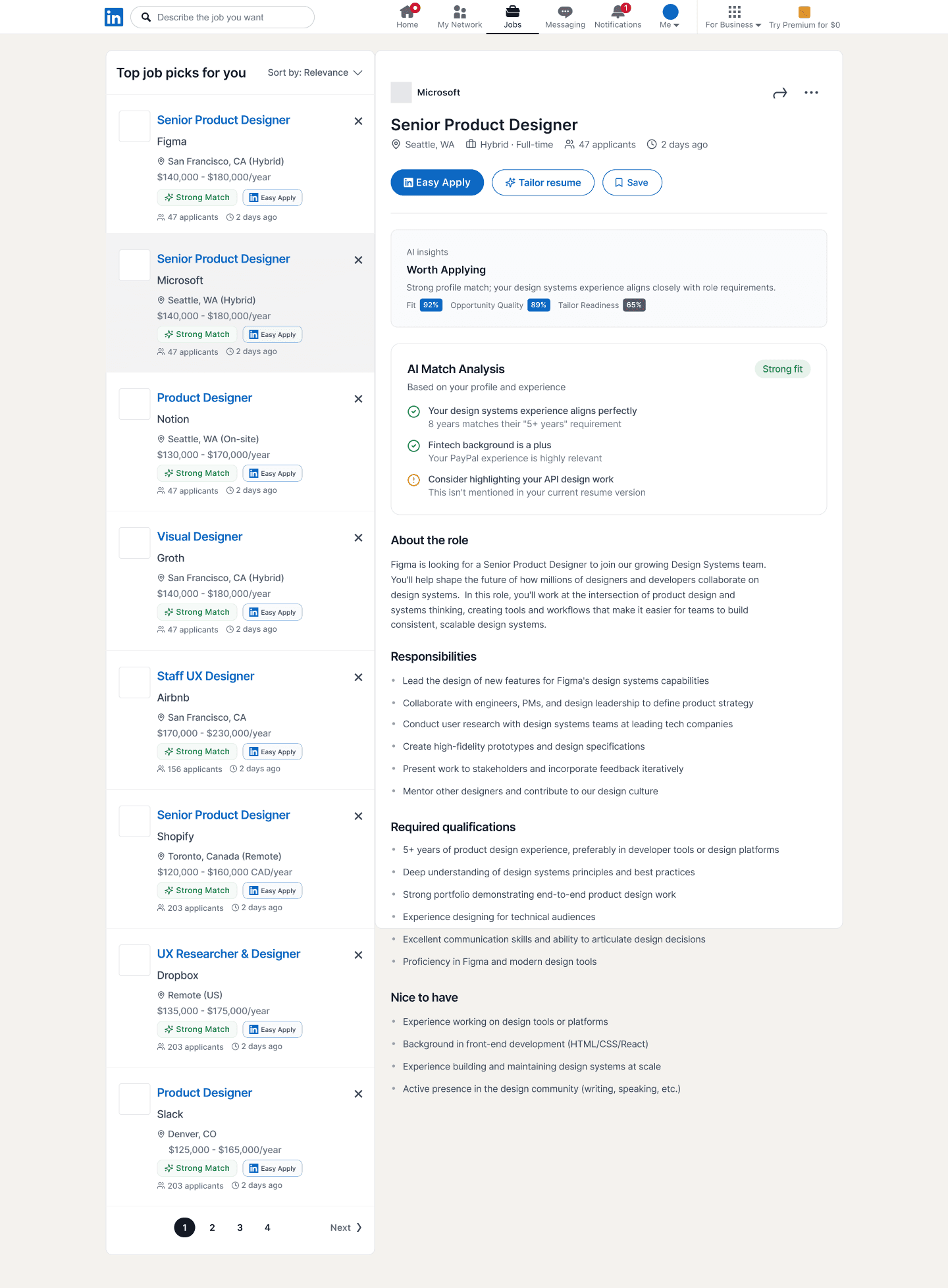
A clearer decision layer that helps users assess fit, understand key information faster, and move forward with more confidence.
USER PAIN POINTS
Users struggled to quickly assess fit and decide whether a role was worth pursuing.
Key job details were difficult to scan quickly
Fit signals were not clear enough to support fast decisions
Important actions and supporting information competed for attention
Before

After
DESIGN IMPROVEMENTS
• Clearer fit signals
Highlighted key job information and cues that help users assess relevance more quickly.
• Stronger information hierarchy
Reorganized content so role details, requirements, and next steps are easier to scan.
• More visible primary actions
Made the main actions easier to notice, helping users move forward with more confidence.
Why it matters
Users can understand what to prepare before entering a long external application flow.
Feature 3
Apply Process
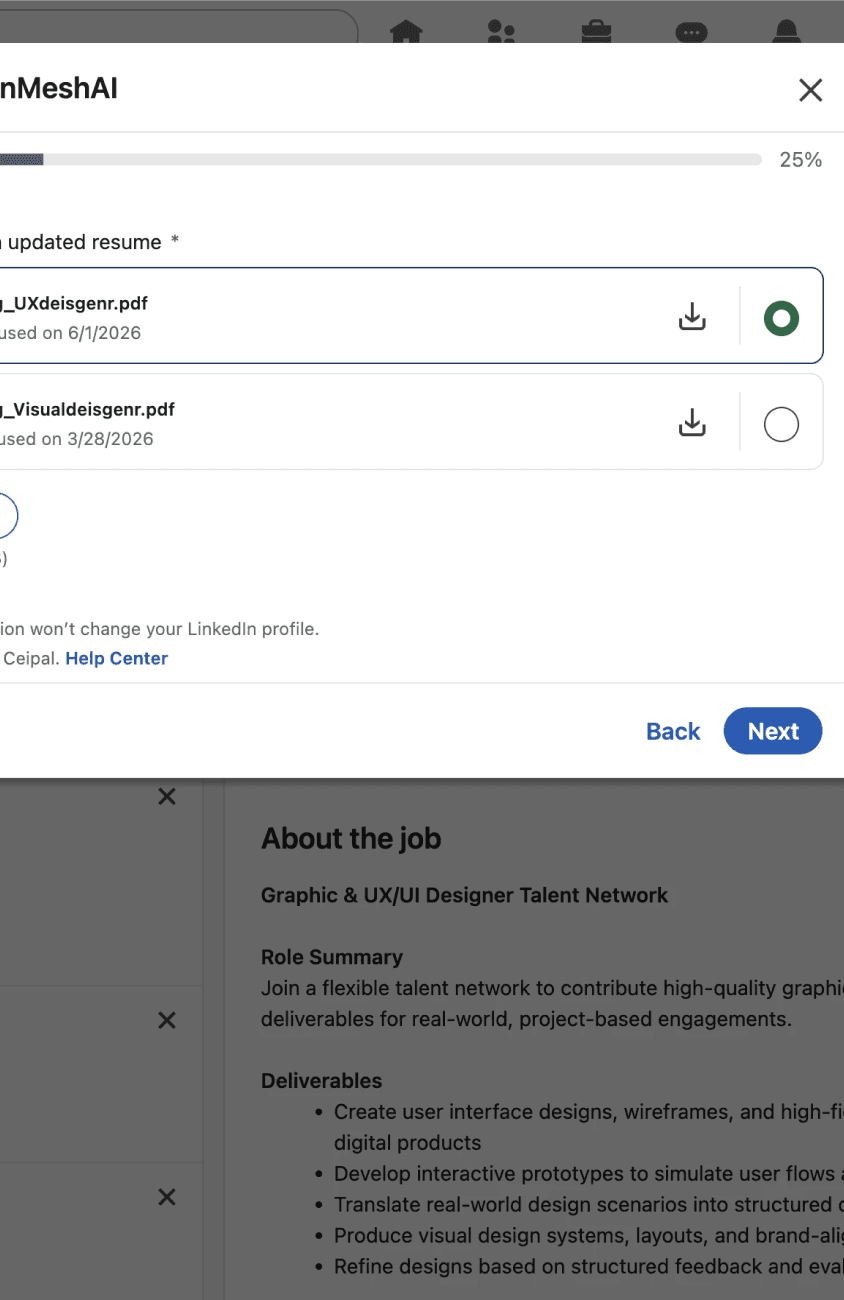
A smoother application flow that reduces friction, supports continuation, and makes resume selection easier to manage.

USER PAIN POINTS
Users struggled to continue the application flow with enough clarity and momentum.
Resume selection felt unclear
Application steps were not easy to follow
Uploading or switching resumes interrupted progress
Before
After

DESIGN IMPROVEMENTS
• Resume selection made clearer
Helped users understand which resume is being used and when to switch versions.
• Better step visibility
Made the application flow easier to follow through clearer structure and progression.
• Lower interruption cost
Reduced friction during resume upload and application continuation.
Why it matters
The experience shifts from scattered memory to a manageable pipeline.
Feature 4
Resume Page
A centralized space for managing tailored resumes, active applications, and job-seeking materials more clearly.
USER PAIN POINTS
Users struggled to manage multiple resume versions and understand which one best fit each opportunity.
Resume versions were scattered and hard to compare
It was unclear which resume was best suited for a role
Resume management felt disconnected from the broader job-seeking workflow
Before

After

DESIGN IMPROVEMENTS
• Centralized resume management
Brought multiple resume versions into one clearer workspace for browsing, updating, and selecting.
• Better resume-to-role visibility
Helped users understand which resume best matched a specific opportunity.
• More connected job-seeking organization
Linked resume management more closely to the broader application workflow.
Why it matters
This supports a more intentional and less repetitive application process.
01
Expected Outcomes
Understand where job seekers lose confidence, time, or clarity during the LinkedIn application process.
Reduce application drop-off
By preparing users before external applications, the flow helps reduce hesitation and abandoned applications.
Improve job prioritization
Job-fit cues and saved-job organization help users decide which roles deserve attention first.
Increase resume confidence
The Resume Hub makes tailored resumes easier to manage and reuse.
Lower cognitive load
A clearer application pipeline reduces the need to track jobs manually across notes, emails, and spreadsheets.
01
What I learned
Job seeking is a long journey, not a single action
Status clarity matters as much as discovery
Resume management is part of the application experience, not a separate task
Better systems reduce uncertainty, not just clicks

12
Next Step
Application reminders / follow-up support
Smarter resume-job matching
Cross-device handoff improvements
Thank you for watching :)
Check the Experience
More
Projects
LinkedIn Redesign
AI powered
read
read
View details
View details

LinkedIn Redesign
AI powered

read
read
View details
View details